Keeping up with code reviews
September 2, 2026
It’s no secret that development speed ramped up dramatically over the first half of 2026. Foundation models hit a tipping point of coding ability, and agentic workflows have multiplied that capacity into a massive boom of code output. This has shifted the bottleneck of development from writing the code to reviewing the code. Engineers complain that they’re exhausted by the pace of PR reviews. Even worse, those PRs are often larger, and likely weren’t read line-by-line by their author.
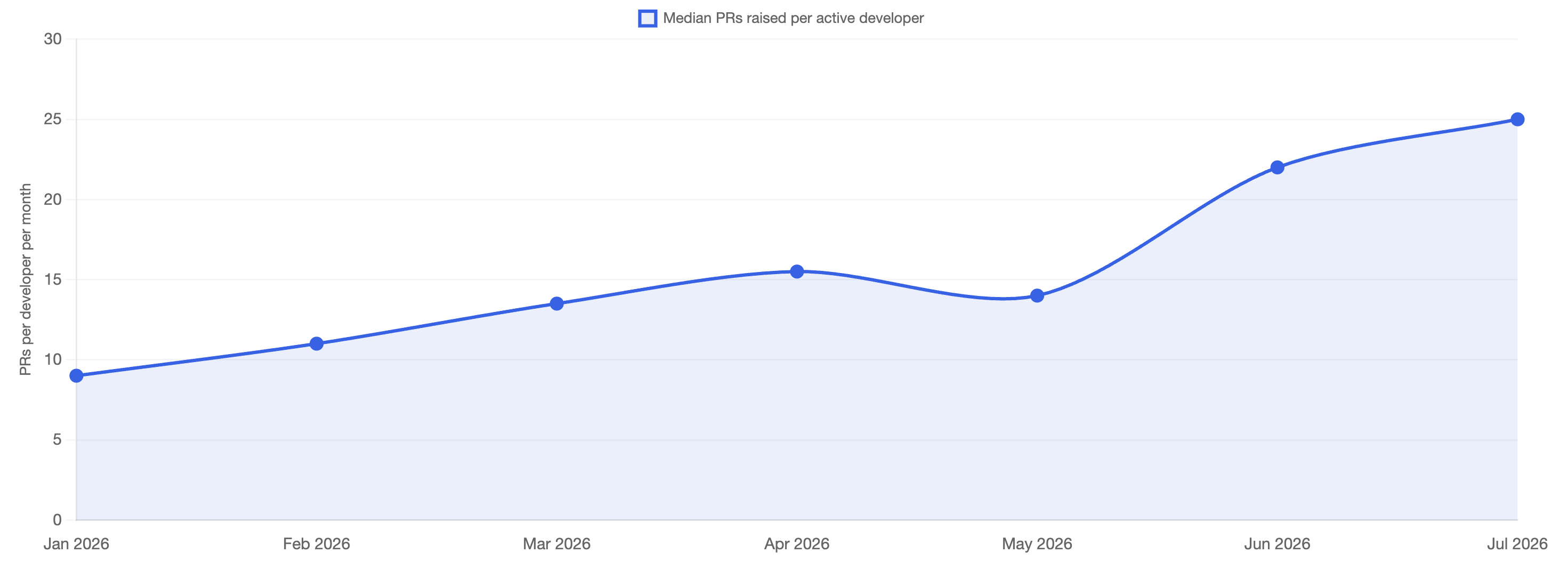
Quantifying this problem, GitHub has reported that monthly commits grew from 1.4 billion to 2.9 billion since April 2026 (source). At my company, each developer now raises 2.8x as many PRs as they did in January.
How can reviewers keep up? How can engineers maintain their sanity, and how can organizations maintain a quality bar in this new ecosystem? I’ve had success with a few strategies.
- Automate low-hanging fruit - stop reviewing for style, syntax, or type errors
- Invest in both sides - use AI tooling to speed up reviews
- Review what matters - you don’t need to review every line of code
# Automate low-hanging fruit
If a computer can deterministically review a PR for something, you should not be spending your time and effort checking for that thing. This is not a new idea, but the increased volume of PRs makes investments in automation even more important. Shift these checks left, and catch issues with auto-save, pre-commit hooks, and PR approval checks. If you find yourself leaving PR comments about indentation, mismatched types, or code style, you should start your investments here.
There’s a lot written in this domain, and tooling available will vary based on your stack. However, there are general types of tools you should be using. Code Formatters (e.g. Prettier, Oxfmt) reformat your code to match style rules on save or on commit. Linters (e.g. ESLint, Ruff) eliminate entire categories of bugs and quality issues, and come out of the box with rules that enforce basic code quality. Type Checkers (e.g. Typescript, Pyright) are a must-have if you are (regrettably) using a dynamically typed language.
Finally, ast-grep deserves a special shoutout. It’s a multi-language tool for structural search and replace. Running it in a pre-commit hook allows you to deterministically enforce all sorts of best practices for your code base. There’s a good catalog of examples here.
# Invest in both sides
To keep up with the speed of AI authored code, you need to invest in AI tooling for reviewing code. I’ve had success with AI code reviewers doing the first pass review, and building custom skills to make human review easier.
# Let AI take the first pass
The most common type of off-the-shelf AI code reviewer is a bug finder. These can be configured to run on every PR revision, and automatically post comments flagging bugs. They will attempt to use broader codebase context, but can often get hyper-focused on the files being changed. The false positive rate tends to be high, but with some configuration I’ve found a lot of value here, and caught some genuinely tricky bugs. Cursor BugBot has worked well for my team, but there is lots of competition in this space.
You can also use these auto-reviewers to check against best practices specific to your code base by defining rules. Rules allow for much more powerful checks than something like ast-grep, at the cost of being expensive and non-deterministic. For example, you can use rules to make a judgement call on whether an error log is actionable or not. If you find yourself leaving similar types of comments on PRs, a single rule can automate that part of your workflow.
If the PR adds or modifies a thrown error or error log, evaluate whether the message would let an on-call engineer diagnose the failure without opening the source. A message is insufficient if it doesn't name the operation that failed and either the offending input or the expected value. Ignore test files.

If insufficient, then:
- Add a non-blocking Suggestion titled "Error message is not actionable"
- Body: "This would appear in logs as '{message}'. Include the failing operation and the relevant input or expected value."
# Speed up human review
In my experience, the most time consuming part of code review is building up context. This typically looks like sequentially reading through every file touched, piecing together what the change is trying to accomplish, where the complexity is, and how everything fits together. LLMs are remarkably good at reading vast amounts of code very quickly, and can create artifacts that make all this information much faster to digest.
We’ve built a few different skills for this at my company, and the one that’s become my daily driver is called /interactive-pr-review. I run it in Claude Code, and it creates an .html slide deck that I use as my starting point. It gives me an overview of what the PR is trying to accomplish, the files touched, and zooms into code that is notable, complex, or high risk. Code that is less risky gets summarized in the overview. It will also take another pass at detecting bugs or risks, and flag those for my review.
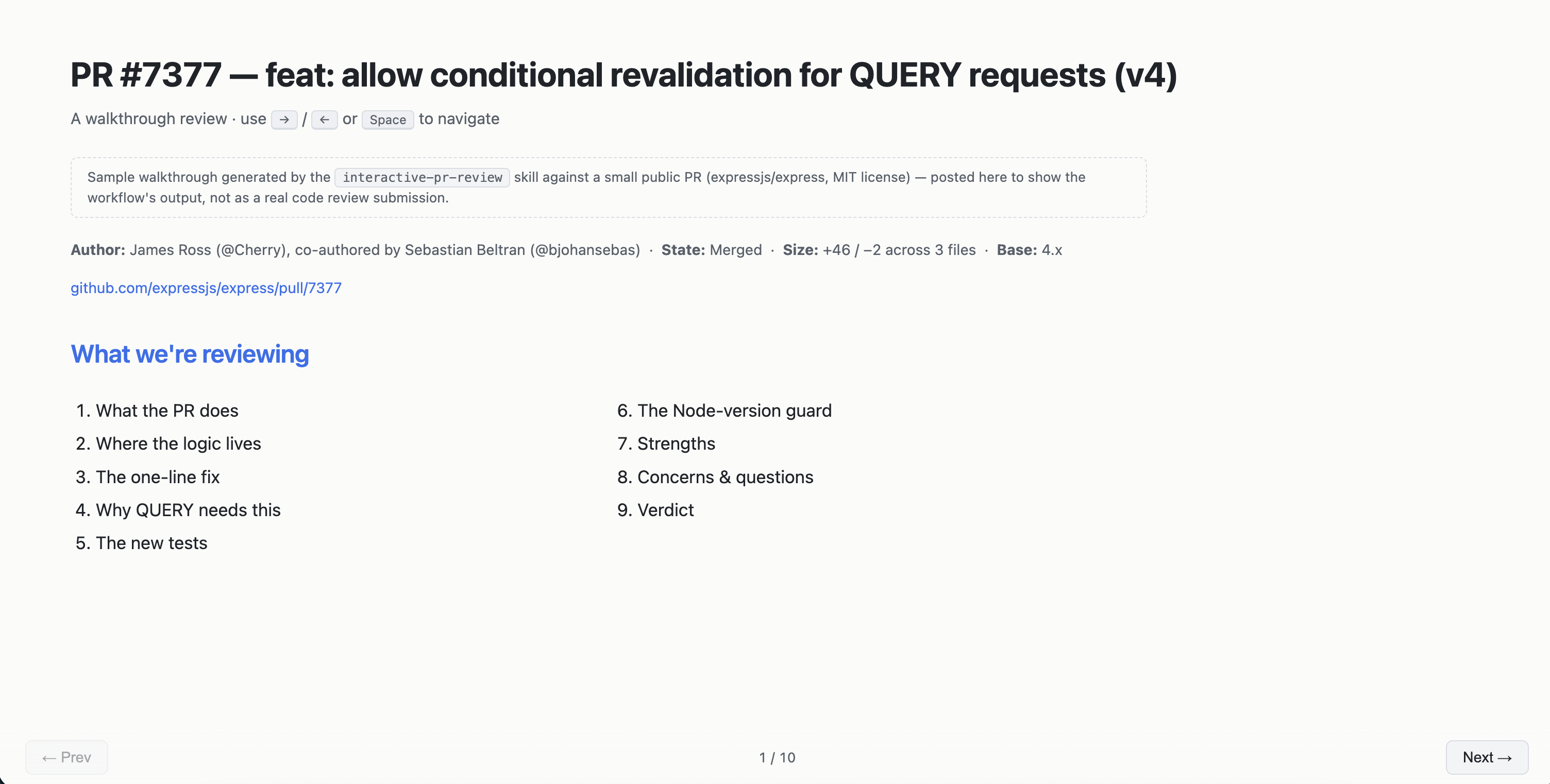
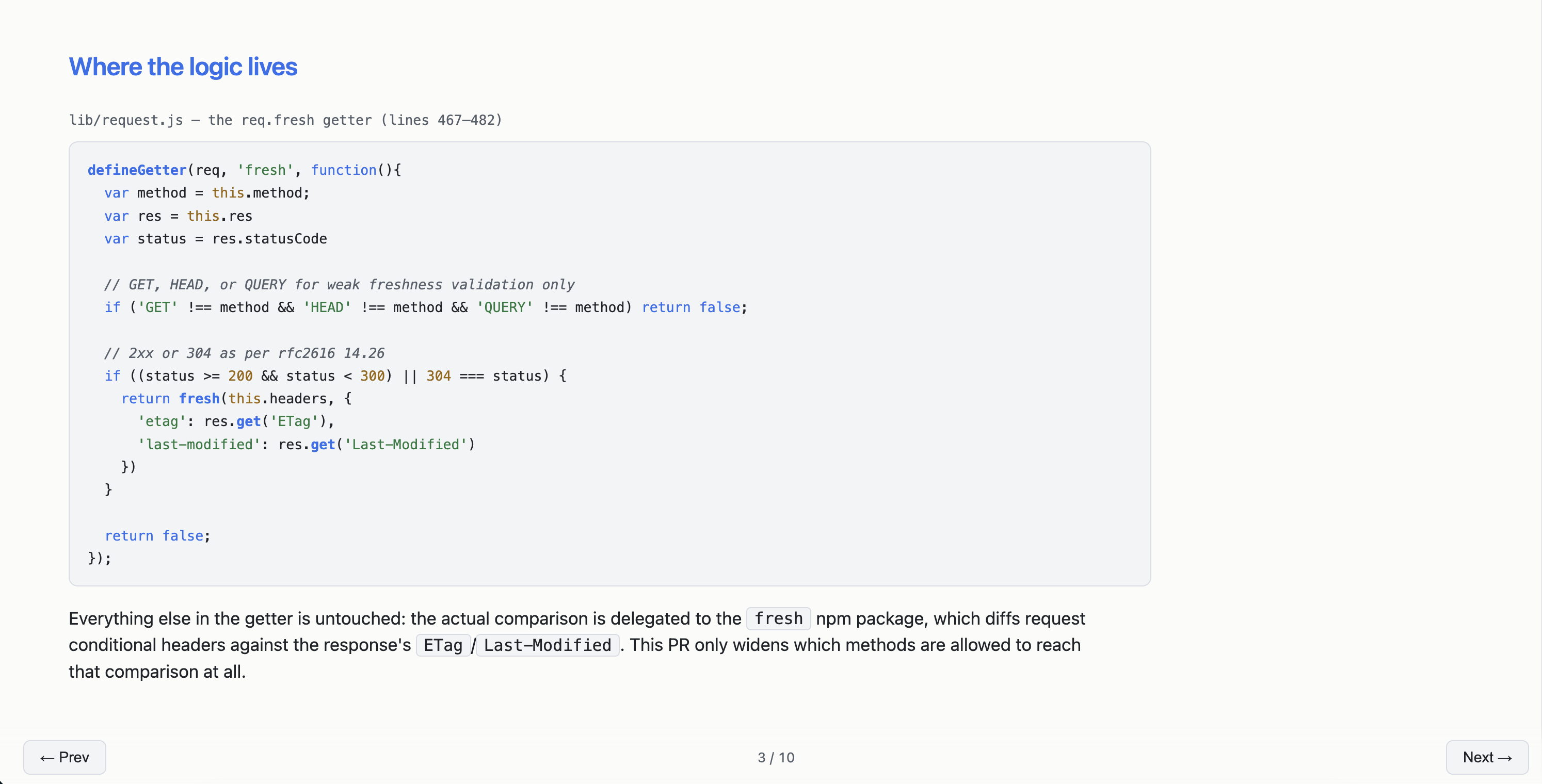
After reading through this deck, I find I have a much better grasp of the change, and know where to dig deeper. I will often ask Claude follow up questions, and can even have Claude automatically go and post the review comments right on the PR.
Coming soon: publishing the specific skill we use
# Review what matters
The implication of leaning on a tool like /interactive-pr-review is that you are no longer reading every line of code in the PRs you approve. This should make you uncomfortable - it certainly made me uncomfortable at first. But like most things, there is nuance here, and the best approach is somewhere in the middle.
It’s worth acknowledging that you already don’t read every line of code you review. You skip over generated files without opening them. You skim unit tests after verifying that the pattern and list of test names looks sufficient. You certainly don’t read the code of all the imported functions. This is because you have confidence in this code - and you’ve built up that confidence over years of learning where to spend your attention, and learning how human authors mess up. It’s also true that the more you trust the particular author, the more you’ll trust the code itself, and the less time you’ll spend checking every line.
Reviewing AI authored code makes this even more true. The difference is that AI authors, when paired with the tooling described above, no rarely fail mechanically. You don’t need to spend your attention checking for style or syntax. You can trust that a tricky function does what it claims to do, and that any logical errors will be caught and flagged. With current generation models and a reasonable test suite in place, the code will almost certainly compile, run, and “work” as prompted.
So what does matter? Where do AI authors fail? In my opinion, you should focus your review on context rather than mechanics. This feels similar to reviewing code from a mid-level engineer who you trust to write code that works, but who is missing some bigger picture thinking. Some sample questions to ask yourself while reviewing:
- Is the approach right? Are we actually solving the problem?
- Can we improve the user experience of this change?
- Can we handle complexity in a simpler way?
- What assumptions were made that may not be true?
- Are there unhandled edge cases that only I know about?
- How will we safely roll this out?
- Will this scale for expected use?
These types of questions focus your attention on the main way AI authors fail - missing context. The model doesn’t understand the nuances of your product, business, or customer, but you do. Spend your time on what only you can review.
# Last caveats
The primary function of a code review is to mitigate risk. As we move faster, there are a few essentials to keep risk to an acceptable level:
- Invest in verification and testing. Agents produce way better results when your systems are verifiable and they can test their own work. Make sure agents can spin up your local environment, and build out robust test suites. AI tooling makes this easier than ever to spin up.
- Prioritize observability and monitoring. Make sure that if you move fast and break things, you find out before your users tell you. LLMs are great at adding metrics, setting up dashboard boilerplate, and creating alerts for you. Make sure someone is holding the pager, and that humans are accountable for production issues.
- Author responsibilities. The other side of this problem, expectations for code authors, isn’t discussed here. But general best practices around PR scope and good descriptions are more important now than ever.
- Always review with context. As engineers, we build up fine-tuned instincts for risk. This doesn’t go away with AI-authored code. A PR for a greenfield prototype is far less risky than a database migration script for your team’s most important table. Review accordingly - you should always read every single line of that migration script.
None of this means caring less about the code. It means spending your attention where it counts, and trusting your tools with the rest.